
( 2 min reading )
Do you ever feel like your day ends before you finish what you set out to do? You are not alone. Many people struggle with productivity because they waste time, lack a clear plan, or forget important tasks. The good news? You can increase efficiency and stay on track using Google Calendar and Google Tasks – two free tools designed to help you plan your day, plan your week, and get things done.
Why You Are Unable to Complete Your Task
Most of us face the same challenges that stop us from finishing our to-do list:
- No daily or weekly plan in place.
- Too many distractions leading to wasted time.
- Difficulty prioritizing tasks.
- Forgetting deadlines because they are not written down.
Without a proper system, your day gets filled with low-priority activities, leaving important work unfinished. This is why you need tools that guide you through your day and week.
First, add all your day-to-day planned work and schedules to the Google Calendar with time slots.
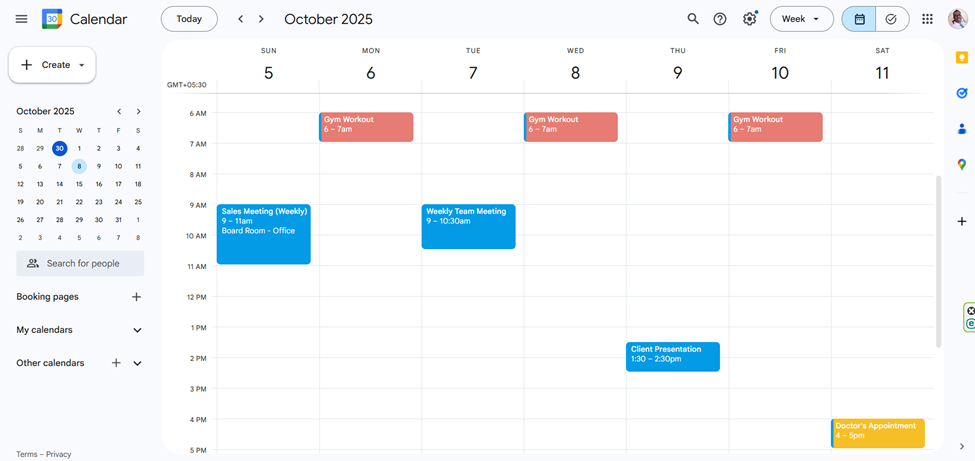
Then find tasks which is in the top left corner.
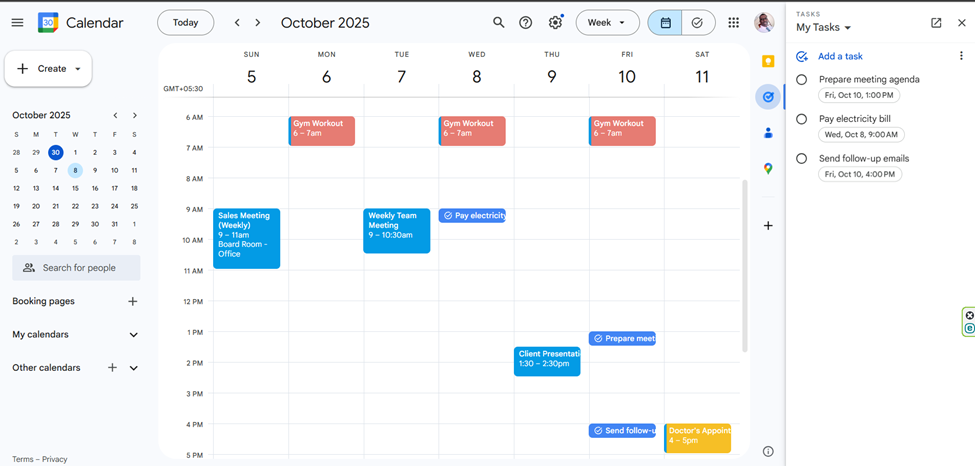
Now you have a better view of your day-to-day events and tasks on one frame. It allows you to clearly see all upcoming events and tasks, and if any two important events or tasks overlap or are scheduled closely together, you can identify them in advance to reschedule
It helps you to prevent stressful situations.
Plan Your Day and Week with Google Calendar
Google Calendar is one of the best free tools for scheduling. Here’s how it helps you increase efficiency:
- Plan your day: Block time for key tasks, meetings, and personal commitments.
- Plan your week: See all upcoming deadlines and events in one place.
- Get reminders to avoid last-minute rush.
- Access your schedule anywhere on desktop or mobile.
By visually mapping out your day and week, you spend less time deciding what to do and more time doing it.
Stay Focused with Google Tasks
Google Tasks is the perfect companion to Calendar. It lets you:
- Write down all your to-dos in one place.
- Break down big projects into smaller, manageable steps.
- Add deadlines so tasks appear in your Calendar automatically.
- Check off tasks as you complete them — giving you a boost of motivation.
When used together, Google Calendar and Google Tasks create a complete system to manage your time and stop wasting it.
Final Thoughts: Increase Your Efficiency Today
Being productive isn’t about being busy — it’s about doing the right things at the right time. With Google Calendar to schedule and Google Tasks to track progress, you can plan your day, plan your week, and finally complete your tasks on time.
Stop wasting time and start taking control of your schedule today — and the best part is, it’s 100% free.